Posts

Release 0.4 Completed

Image
     This is the final blog post for this semester. I've finished and sent out a Pull Request for my Issue on Import Youtube Playlist Feature. There were some changes in terms of how the items are returned as items, and due to that, the number of items in a valid playlist will be reduced to 100 items.     In this project, I spent a lot of time going through routes and components, as well as how the frontend gets data from its server by using Axio HTTP requests. I got the UI part of the issue done relatively quick due to me getting quite used to making react components, but the majority of the time was spent on knowing how Youtube API will work as well as how I can set up an API endpoint in the server for the data that I will need to retrieve for my feature.     Basically, the user will enter the playlist's URL into the input box and that string of URL will be passed to a function on click and concatenated to the server's API path where an Axios reques...

Release 0.4 - qasong Import Youtube Playlist

Image
       I have started working on the Issue  after the repository's owner Ian had assigned it to me. As of now, I could say that I am about 40 percent to finish adding this feature. So far I added a new component inside the Navbar's menu which when clicked will show a dialog box prompting for a Youtube playlist URL.     The input box's value will be passed to another function that accesses the server to generate an object containing the Youtube playlist's items in the same format as qasong's queue items. If the URL is blank or invalid, an error message will appear above the button to notify the user.     As for how to get the playlist's items, I learned that you could access data from Youtube links by utilizing Google API's Youtube API. One problem that came up is that it requires the use of an API key that is created from Google Developer Projects which might hit a limit for the number of requests allowed to be made. I then tried to use sever...

Release 0.4

     The final assignment is finally here, it is almost time to say goodbye to this semester. Throughout the semester, we've done many different things and was involved in several open-source projects where we learned and overcame problems. This is the best course to explore Github and get some hands-on experience with programming, the open-source community is vast and filled with professionals that you can work with as well as learn from.     For the final assessment, I'd like to work on a feature that I've never touched before to prove that I did indeed grow as a programmer from taking this course. I decided to work on a repository that had started contributing to since Release 0.2, qasong . I picked this because they are a project that is near launch and I grew to like their team's effort as well as what they do, I definitely learned a lot more about React by contributing.      I am currently contemplating on taking an old issue that was never...

Lab 9 Blog

    It is finally time for us to publish our Release 0.1 projects for public use! As we are getting close to the end of the semester it is about time for everyone in the class to publish their very first package so others can use it. I myself am excited to finally finish the first release of our project.     We are instructed to choose a package release method, and since I've uploaded it to Node Package Manager for my project's initial release, all I have to do is to use NPM and update the existing package . I had decided to google the methods for the project's initial release, the only things I really have to do in this lab is to update the release tag in my package.json as well as other documentation about the tool. To update an existing package, you simply had to use "npm publish" in the repository folder after logging in using "npm login".     After the documentation about the features, instructions, and versions are all up to date, I had a few frie...

Lab 8 Blog

Image
       Lab 8 was about managing a project complexity through automated testing, this week we worked on our  Release 0.1  link checker by creating testers using Jest and other testing frameworks for the language we used in our project. Adding automated testing sequences for projects is important for consistency, usability, and security for any application. A good and solid testing program covers most of the code with different testing methods.     Different languages require a different testing framework to set up with, and since my project was written in Node.js, the best choices I had were either  Jest  (created by Facebook) or  Mocha . I went with Jest because I am familiar with React which was made by the same company so I could expect handling similar coding styles. Jest can be installed by using the Node Package Manager and then activate the command by declaring the test scripts in package.json.  To get started with testin...

Release 0.3 Internal PR

Image
     One of the Pull Request  for Release 0.3 was to work on an Issue for Telescope, knowing that I had already done an issue on Telescope during Release 0.2, I was happy to make another contribution to the project. This time, I decided to work on the notification favicon .     At first, I thought it was just a simple task of creating a version of the favicon with a red dot on the top right corner and then changing the favicon from a component, but it was a lot more than I bargained for. There are several things that need to be done in order to get this feature working, the state of the current window's visibility must be determined first in order to execute the hook that changes the favicon. Once that is done, you will have to obtain the id value of the previous app page's top post and compare it to the current state's top post's id. When all the conditions are met, the favicon of the website should switch to the badged version until the window is visible ...

Release 0.3 External PR

Image
     In this month's Release 0.3 assignment, we were required to make a total of two Pull Requests. One of which is a pull request that is an external project, we will be making another contribution to other people's repository. I decided to revisit one of the repositories that I visited back in Release 0.2, the Artistify web app . I felt more comfortable to work on something that I already took the time to understand, the owner of the repository made a big change to the project compared to the last time I worked on it and I am excited to make more additions to their project.     This time I worked on two separate issues in one Pull Request due to the first issue being required to complete before working on the second issue . The issue asked for someone to add a spinner animation or placeholder while the Top 100 list on the Billboard page is loading. This sounded really similar to what I did for the third pull request in Release 0.2, which was adding a loading...

Lab 7 Blog

Image
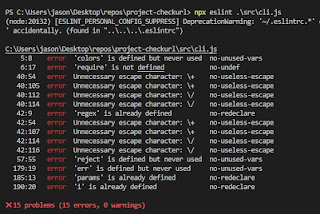
     In Lab 7 we went back to our Release 0.1 link checker project and worked on creating a CONTRIBUTION.md file, source code formatter, linter, and an integration method for the said code formatter and linter.      The contribution file is added for the purpose of guiding Github users that visit our repositories the way to set up the project locally and help them get a headstart with their pull requests, in that file we will also be discussing how to develop & use the program as well as formatting and error checks.     Since my project was made using Javascript, I chose Prettier and ESLint for my formatting and linter. Prettier was installed using the step by step instructions on their official website  through CLI, initially there was a problem with the .prettierrc.json file for it was generating errors when trying to run the prettier command. This problem was fixed by manually creating the file instead of using their echo command. Pr...

Lab 6 Blog

Image
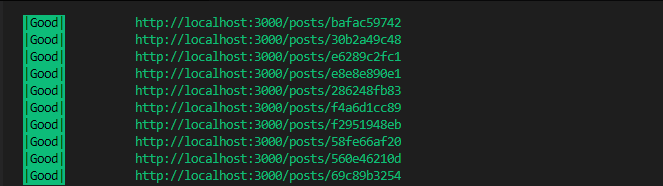
     The first thing we were assigned to do after Hacktoberfest ended was to get ourselves started on the Telescope project along with other students and professors of OSD. This week, we are to install pre-requisites for Telescope to run locally and then modify our Release 0.1 to be able to process post data URLs from localhost:3000/posts.      A long process of installation was required, but since I decided to work on Telescope during Hacktoberfest's 3rd Pull Request , I had already done what was required to do for the lab. Information on that can be found in my 3rd PR's Blog .     Our task for this lab was to use our URL checker on the URLs that exist within localhost:3000/posts. In order to do this with the existing code for my Release 0.1, I made a new argument '--t' or '--telescope' that takes an URL and receives the data it returns using Axio. After the data has been received, the URLs of each element will be stored inside a string. The str...

Hacktoberfest - PR #4

Image
    The final Pull Request for Hacktoberfest is here and I decided to look for an issue that is about front-end creations, just like my previous Pull Request . I found a repository named Artistify , which was suggested by a fellow student Jasper Mui for he had worked on that same repository for his final Pull Request.      Artistify  is a web app that can pull music videos from youtube and allow the users to create their own list of songs and play them in the queue order. The Issue  requested for buttons on the queue cards to allow change for the position in the queue of hovered queue cards, moving the current card up or down the queued list. This feature was needed in case the already implemented drag and drop function fails to function, it is a good alternate option to move queue cards.     To get started with the new feature, first I had to gain a general sense of how the web app manages queue lists in the front-end. I was able to get a...

Hacktoberfest - PR #3

Image
    For the third Pull Request , I decided to work on the Repository made by OSD students present and past. The Telescope is an app that displays and updates all the students at OSD's blog posts in chronological order, I thought since I was working on CSS and HTML for my second pull request at Hacktoberfest, I may understand the front-end parts of the app better.     I picked up an Issue on creating User Experience for when errors occur in terms of displaying the blog posts. There were three specific situations that David Humphrey, our professor, mentioned:       - When the post fails to load      - When the post is still loading      - When the loading for the entire timeline fails          In order to get started on the issue, I had to go through various different kinds of installation to allow the code to run locally. Setting up  Elasticsearch and Redis Server pre-requisites took lon...

Hacktoberfest - PR #2

Image
     For my second Hacktoberfest pull request , I found an issue on a repository for Health Assistant Client , it was a relatively new repository for it was only at the starting phases in terms of front-end. I thought that this would make a good warm-up for Javascript front-end programming because I plan to work on more front-end things for the rest of the Hacktoberfest.     The issue requested a Navigation Bar for the web app that serves as the base Navbar design. The Navbar will have an icon on the left side and four buttons on the right that will hold hyperlink references to other paths of the site, with the contact button being an actual button element.     I had almost completely forgotten how to create Navbars using HTML, but thanks to a tutorial provided by the repository's owner, I could finish it with much ease. There wasn't anything too challenging other than the fact that the web design courses we took we made mostly with React or other Jav...

Lab 5 Blog

     Lab 5 of the OSD555 course had assigned us the task of cleaning up and organizing our project's code. We were instructed to reduce the amount of unneeded code by removing any global or unused variables, make variable names easier to understand, and refactor any repeated codes that exist within the project. We utilized the rebase command to merge with the main branch nicely.     The lab this time is meant to have us learn how to use the git command 'rebase', it is a command that allows multiple commits done under one section/branch to be committed as one single action. This command will come in handy when making multiple fixes and changes that are under the same category, and allow for a clean commit history on the repository.     I found a duplicated code running for the file reading operation merged from Lab 4's issue, and reduces it to only one by making the first file reading operation conditional, but pass in the parameters as nullptr to prev...

Lab 4 Blog

     This week's lab consisted of going to a new user's repository that we haven't worked on before, and add a new feature called "Ignore URL Patterns" onto their Release 0.1 repository. This feature will be activated after a new argument '--ignore' had been received, containing the ignore argument will allow the CLI tool to read two files in order: the file that contains the list of URLs that will be ignored by the link checker, and the argument after that will be the targeted file to scan.     I created an Issue on another person's Repository , and once I got permission to work on the issue, I Forked the repository into my own and cloned that forked repository into my local machine. I ran through the code and got a better understanding of how the code works before working to add the feature in.     After the feature had been completed, I contacted the owner of the project through the issue that was opened to let him know that I had finished the fea...

Hacktoberfest - PR #1

     Hacktoberfest has started! This is the first week of the event, and I've found a Repository that maintains a list of algorithms and data structure implementations featuring many different types of languages. There were already around 60 contributors at that time.       I chose an Issue that was still open, which was to implement Bin-Sort in C#. I've never done C# coding, but I heard it was similar to Java, so I gave it a go. While I waited for my request to work on the issue to be accepted, I searched up on how to work with codes in C#. As expected, it was similar to Java where the functions and the Main() function are located under the same class scope, the only difference to me was some keywords and function names.       After my request to take on the issue was approved by the assignee, I started to work on the bucket sort function. The function takes in an array, as well as the size of the passed array as n, after determi...

Lab 3 Blog

Image
     This time for our Lab 3, we were assigned to add two features into the CLI tool project that we worked on from Release 0.1. We have to first send an issue to the repository, and then close the issue after merging the issued branch with the original one.      The first feature that I decided to add to my program was to add '--good', '--bad', and '--all' arguments to the command-line tool, this feature will allow the user to filter out the resulting URLs according to the arguments that are present. I made sure that all the arguments can be applied at the same time. If the user wished to see both good and bad arguments, then all they had to do is include both arguments into the command. Additionally, the arguments can be put in any order of which it is entered. Meaning that it will read the file location correctly no matter which position of the arguments it is in.     As the first feature went smoothly, the second feature wasn't completed as ...

Lab 2 Blog

     Today I contributed to another user's project on GitHub , I wanted to work on a feature where it counts how many times each type of HTTP status code as well as URLs in total has been checked, and then display it as a result section of the output.      First I sent out an Issue on his repository regarding what I wanted to do and proposed to work on it myself. After I finished adding my feature, I issued a pull request to the person's repository as I wait for feedback.      During the making of the Result Counter feature, I started by creating variables to hold all the counters and display messages. Then, I put the counters inside the loop that determines the status of the URLs, counting each and every time the if statement was valid. The total amount of URLs are added each time the loop had completed. One major problem I came across while making this feature was the fact that the result message were displayed before the list of URLs we...

Lab 1 Blog

 For Lab 1 I was instructed to look for other people that had also worked on their Release 0.1  so that we could help each other by testing/reviewing each other's project. I sent out a message on the OSD600 slack channel to look for a person to partner up with, and to my surprise, there were two people that responded to me within the first 5 minutes. Since there were 2 people that asked for partnership, I suggested that we could work as 3 people to possibly increase the amount of feedback going around the circle. As I checked other people's work, I noticed minor problems like error filtering, I was surprised that there were little to no mistakes within the codes itself. However, I did find some areas that could be improved in terms of easier ways to install the project through uploading to npm and commenting within the codes to help to explain the functions. When my partner reviewed my work, he was able to find problems that I had let go unnoticed. I hadn't considered the...

Release 0.1: project-checkurl

Image
 This is the first project that I have done for OSD600, which is a CLI tool used to detect and scan URLs that exist within a document that contains texts and then proceeds to test if the detected links are available or not based on their returning HTTPS status code. This project was created in Javascript with the help of Node.js. Because I have never made a CLI tool before, I learned plenty of things during the making of this project. The option of choosing any language to create your project had allowed me to be more creative with my work, for there were no restrictions on how things are supposed to be done. How does it work? This tool requires an NPM(Node Package Manager) to be installed. It will read the file as an argument and then proceed to run through the file for URLs which are then scanned for their HTTP status codes for their availability. The outputs are color-coded into three main colors: 1. Green Lines for Good Links . [200] 2. Red Lines for Bad Links . [400 or 404] ...

Intro Blog

 Hello everyone, my name is ZongJin (Jason) Jiang. I live in Toronto, Ontario and I am currently taking OSD600 with the means to experience what Open Source Software Development is like, to code within a community and receive guidance so I can grow as a developer.  So far into my semesters at Seneca College, I've taken courses on C++, Java, Javascript, and other Web Development Open Source libraries like Node.js, React, and Angular. I know what Open Source Development is, but I have yet to experience what it is like to be apart of it and engaging with the community. The Github Repository I forked was https://github.com/zjjiang2/cocos2d-x , which is a Multi-platform Framework for developing 2D games. I've always taken interest in game development since I myself play a lot of games, thus sometimes I look for game developing materials to look at and learn from them.